Appearance
The hosted connect flow
The hosted flow is how your users connect their bank: you create a connect session on your backend, send the user to the returned hostedUrl, and we take it from there — bank picker, consent, the bank's own OAuth, progress, and the redirect back to you. Your API key never touches the user's device, and the bank sees a real browser (banks block embedded WebViews).
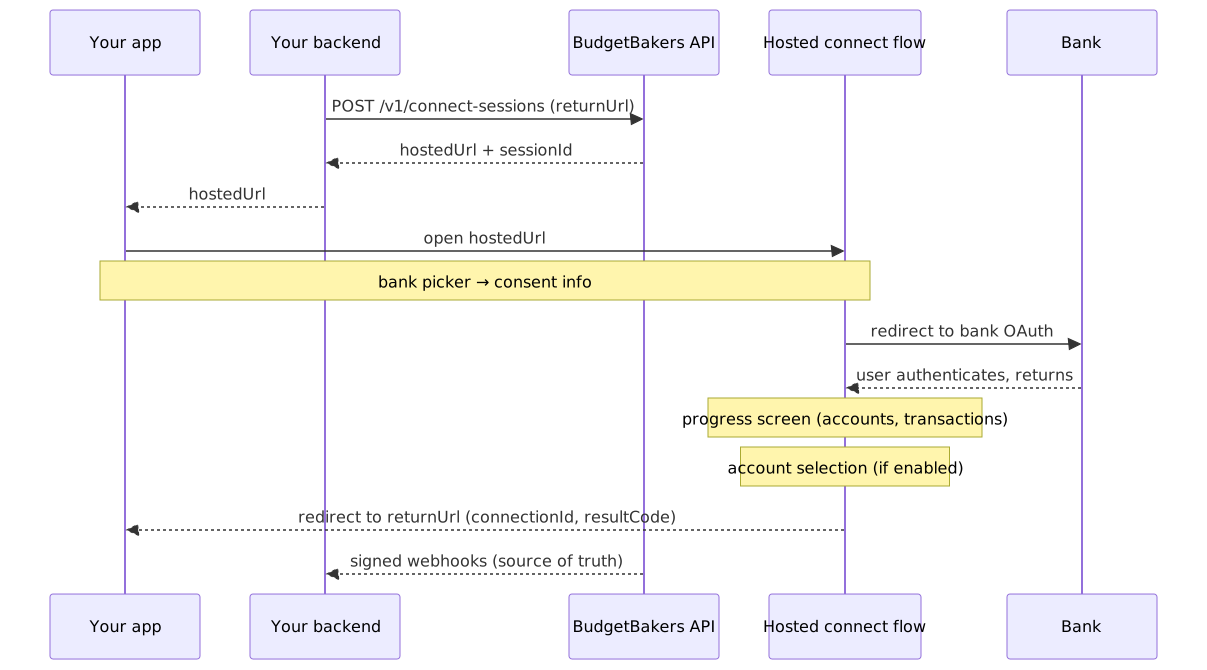
- Your backend creates a session:
POST /v1/connect-sessionswith thereturnUrlthis user should land on. - You open
hostedUrl— as a web redirect, or via the iOS / Android Link SDKs. - The user picks a bank (skipped if you set
providerId), sees the consent info, and is redirected to the bank's OAuth. - Back from the bank, a progress screen tracks the data download; if account selection is enabled for you, the user can deselect accounts here.
- The user is redirected to your
returnUrlwith the result, and your backend receives the authoritative events as webhooks.
Connect sessions
sh
curl -X POST https://partner.bbapi.io/v1/connect-sessions \
  -H "X-Api-Key: {{BB_API_KEY}}" \
  -H "X-Client-Id: <clientId>" \
  -H "Content-Type: application/json" \
  -d '{ "returnUrl": "https://app.example.com/bb-callback" }'
json
{
  "sessionId": "cs_9c1e…",
  "hostedUrl": "https://aisp-connect.bbapi.io/s/<one-time-token>",
  "expiresAt": "2026-07-15T10:35:00Z"
}- The
hostedUrltoken is one-time — the first load consumes it. Hand it to the user immediately and never reuse it. expiresAtis the single expiry to honor. An expired session ends in theExpiredstate with a friendly screen; just create a new session.POST /v1/connect-sessionsaccepts anIdempotency-Keyheader — a retry with the same key replays the original response instead of minting a second session.- Optional fields:
locale(UI language),country(preselects the bank picker's country),providerId(skips the picker entirely).
Track the session from your backend:
sh
curl https://partner.bbapi.io/v1/connect-sessions/<sessionId> \
  -H "X-Api-Key: {{BB_API_KEY}}" \
-H "X-Client-Id: <clientId>"| Session state | Meaning |
|---|---|
AwaitingBankSelection | user is in the bank picker |
RedirectedToBank | handed off to the bank's OAuth |
Authenticating | user is authenticating at the bank |
Fetching | accounts and transactions are downloading |
AwaitingAccountSelection | user is choosing which accounts to keep |
Completed | terminal — connectionId is set |
Failed | terminal — see the failure webhook for the reason |
Cancelled | terminal — user cancelled |
Expired | terminal — session outlived expiresAt |
The return redirect
The final redirect to your returnUrl appends connectionId, resultCode (Ok | Error | Cancelled), sessionId, and error on failure.
Two rules keep integrations robust:
returnUrlis allowlisted. The portal (Apps → return URLs) holds your registered patterns — web URLs, iOS universal links, Android app links, custom schemes. Each session passes the concrete URL for this user; it must match a registered pattern or the create fails withvalidation_error.- The redirect is a UX signal, not the result. Users close tabs and switch apps mid-flow; the redirect may never arrive. The authoritative outcome is the session state and the webhooks (
ConnectionCreateSuccess/ConnectionCreateFailed).
Account selection
If account selection is enabled for your integration, users see the accounts covered by their bank consent all pre-selected and can only deselect — the selection can never exceed what the bank authorized. Deselected accounts end unsubscribed: they exist on the connection but are excluded from your subscribed view. You can flip subscriptions later via PATCH /v1/accounts/{id}/subscribe and DELETE /v1/accounts/{id}/subscribe.
Connection lifecycle
A successful flow produces a connection — the durable link to one bank consent. It moves through four states:
| State | Meaning | Recovery |
|---|---|---|
Pending | transient during creation — never a resting state | — |
Active | authorized, consent valid | — |
Inactive | consent expired or revoked, or refreshes kept failing | reconnect → Active |
Disabled | the flow never completed (consent never obtained) | none — create a new connection |
- Consent expiry and revocation arrive as
ConnectionConsentExpired/ConnectionConsentRevokedwebhooks and flip the connection toInactive. - Reconnect (
POST /v1/connections/{id}/reconnect) repeats the bank authorization for anInactiveconnection and keeps the sameconnectionId— your account and transaction history stay attached. - Reconnecting a
Disabledconnection is rejected; start a new connect session instead.
Refresh never redirects
POST /v1/connections/{id}/refresh fetches new transactions in the background and returns 202 Accepted — there is nothing to show the user. If the bank demands re-authentication, the refresh fails, the connection goes Inactive, and reconnect is the recovery path. Refreshes are also guarded by a cooldown and per-day quotas — handle refresh_cooldown, refresh_in_progress, and refresh_quota_exceeded per the error reference.